
정의 및 사용 방법
-webkit-text-stroke 속성은
텍스트 문자에 테두리 외곽선(획, stroke)을 스타일하는 속성입니다.
속성의 사용 방법과 주의할 점, 활용 예제 등에 대해 알아봅니다.
- 이 속성은 텍스트 문자 테두리 외곽선의 두께(굵기)를 설정하는
-webkit-text-stroke-width속성과 - 텍스트 문자 테두리 외곽선의 색상을 설정하는
-webkit-text-stroke-color속성을 - 한 번에 지정하는 단축 속성(shorthand property)입니다.
기본 예제
TEXT STROKE
형식 구문
selector {
-webkit-text-stroke: <'-webkit-text-stroke-width'> || <'-webkit-text-stroke-color'>;
/*
이 값은
-webkit-text-stroke-width,
-webkit-text-stroke-color 속성의 값입니다.
지정하는 속성 값의 순서는 상관없습니다.
지정하지 않은(생략한) 속성의 값은 초깃값이 적용됩니다.
*/
}
구문
/* width | color */
-webkit-text-stroke: 3px magenta;
-webkit-text-stroke: thin magenta;
-webkit-text-stroke: medium magenta;
-webkit-text-stroke: thick magenta;
/* color | width */
-webkit-text-stroke: magenta 3px;
-webkit-text-stroke: rgba(0, 0, 0, 0.6) 3px;
/* width: % 단위 적용 불가 */
-webkit-text-stroke: 5% magenta;
/* 글로벌 값 */
-webkit-text-stroke: inherit;
-webkit-text-stroke: initial;
-webkit-text-stroke: revert;
-webkit-text-stroke: revert-layer;
-webkit-text-stroke: unset;
형식 정의
| 초깃값 | 각 단축 속성별로:
-webkit-text-stroke-width: 0
-webkit-text-stroke-color: currentcolor (현재 글자색) |
|---|---|
| 적용 요소 | 모든 요소 |
| 상속 | 예 |
| 애니메이션 | -webkit-text-stroke-color 값만 적용됨 |
주의할 점
- 애니메이션은
-webkit-text-stroke-color값에만 적용됩니다.-webkit-text-stroke-width값에는 적용되지 않습니다. -webkit-text-stroke-width값의 단위로 백분율(%)을 사용할 수 없습니다.- 가변형 폰트(Variable Font)에서 겹쳐 보이는 현상(Overlapping Paths)이 발생할 수 있습니다.
가변형 폰트(Variable Font)에서 겹쳐 보이는 현상(Overlapping Paths)
기존 폰트(Static Fonts)는 각 글꼴의 두께(예: Thin, Light, Regular, Bold 등), 너비(Width), 기울기(Slant) 등 스타일마다 각각의 글꼴 파일이 있습니다. 기존의 폰트가 굵기마다 별도 파일을 사용했다면, 가변형 폰트(Variable Fonts)는 모든 스타일의 조합이 단일 파일에 통합되어 있습니다.
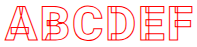
가변형 폰트(Variable Font)에 -webkit-text-stroke를 적용하면 텍스트 문자의 테두리 외곽선(획)끼리 겹쳐 보이는 현상(Overlapping Paths)이 발생합니다.
가변형 폰트는 굵기나 너비를 유연하게 조절하기 위해 하나의 글자를 여러 개의 도형 조각으로 겹쳐서 만듭니다. -webkit-text-stroke은 각 도형 조각의 테두리를 모두 그립니다. 이로 인해 글자 내부에서 도형이 겹치는 부분까지 외곽선이 생기면서 지저분한 선들이 나타나게 됩니다.
대표적으로 Google Fonts에서 제공하는 "roboto" 글꼴은 가변형 폰트입니다.
아래는 "roboto" 글꼴에 -webkit-text-stroke를 적용한 실제 데모 예제입니다.
<style>
@import url('https://fonts.googleapis.com/css2?family=Roboto+Mono:ital,wght@0,100..700;1,100..700&family=Roboto:ital,wght@0,900;1,900&display=swap');
.text {
font-family: "Roboto", sans-serif;
font-size: 47px;
font-weight: 900;
-webkit-text-fill-color: transparent;
-webkit-text-stroke: 1px red;
}
</style>
<p class="text">ABCDEF</p>
ABCDEF
만약 이러한 겹쳐 보이는 현상(Overlapping Paths)이 발생하지 않으면 좋겠지만, 브라우저의 렌더링 방식이 바뀌지 않는 한 '자동으로' 해결되기는 어렵습니다.
활용 예제
-webkit-text-stroke 속성을 활용한 텍스트 문자의 스타일을 몇 가지 예로 살펴보겠습니다.
테두리 외곽선만 있는 텍스트 문자
<style>
.text {
font-size: 47px;
font-weight: 900;
-webkit-text-fill-color: transparent;
-webkit-text-stroke: 1px red;
}
</style>
<p class="text">TEXT STROKE</p>
TEXT STROKE
위 예제에서 사용한 -webkit-text-fill-color 속성은 텍스트 문자를 채우는 색상을 지정합니다. 이 속성은 글자색을 지정하는 color을 대신합니다.
테두리 외곽선만 있는 텍스트 문자에 box-shadow 추가하기
<style>
.text {
font-size: 47px;
font-weight: 900;
color: #fff;
-webkit-text-stroke: 1px red;
text-shadow: 1px 4px red;
}
</style>
<p class="text">TEXT STROKE</p>
TEXT STROKE
그라디언트 테두리 외곽선이 있는 텍스트 문자
<style>
.text {
font-size: 47px;
font-weight: 900;
color: #fff;
-webkit-text-stroke: 5px transparent;
-webkit-background-clip: text;
background-clip: text;
background-image: linear-gradient(to bottom, red, blue);
}
</style>
<p class="text">TEXT STROKE</p>
TEXT STROKE
브라우저 호환성
| 속성 |
데스크탑 Chrome
|
데스크탑데스크탑 Edge
|
데스크탑 Firefox
|
Safari
|
|---|---|---|---|---|
-webkit-text-stroke
|
4 | 5 | 49 | 3 |
명세서
| 명세서 사양 | |
|---|---|
-webkit-text-stroke
|
Compatibility Standard #the-webkit-text-stroke |